
To forward emails to another email address:
-
Log in to your cPanel account.
-
Go to the Email section and click Forwarders, then select Add Forwarder.

-
Fill in the required details:
-
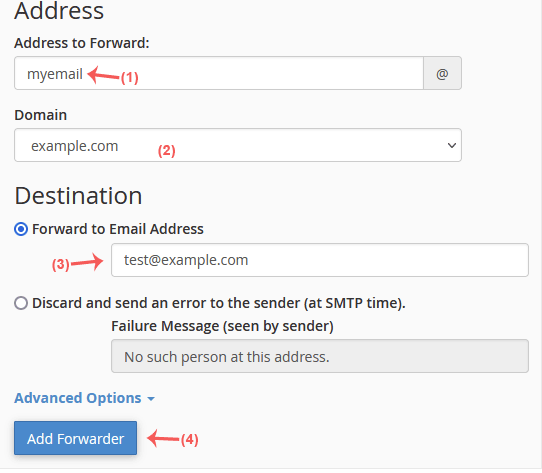
Address to Forward: Enter the local part of the email you want to forward (for example,
myemailif forwardingmyemail@example.com). -
Domain: Choose the correct domain from the drop-down list if you manage multiple domains.
-
-
In the Destination field, select Forward to email address and enter the email address where you want to receive the forwarded messages.
-
Click Add Forwarder to save.
To forward emails to a script or program (mail pipe):
-
Go to the Email section, click Forwarders, and choose Add Forwarder.
-
Enter the same details for Address to Forward and Domain as above.
-
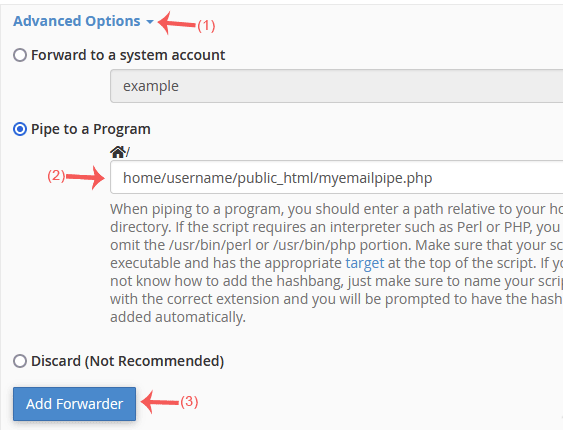
In the Destination field, click Advanced Options, select Pipe to a Program, and provide the full path to your script, e.g.,
home/username/public_html/myemailpipe.php(do not start the path with a slash).
-
Click Add Forwarder to activate the forwarding.

