
If you’ll be away and unable to respond to emails, you can set up an autoresponder to automatically reply to incoming messages.
To create an autoresponder:
-
Log in to your cPanel account.
-
Go to the Email section and click Autoresponders.

-
Click Add Autoresponder.
-
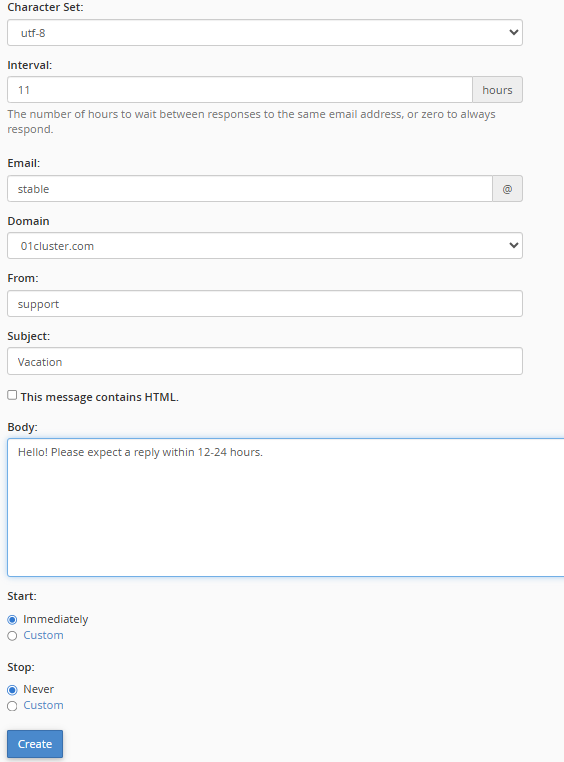
Fill in the following details:
-
Interval: Set how many hours to wait before responding again to the same email address.
-
Email: Enter the email address to enable the autoresponder (e.g., enter
supportforsupport@example.com). -
Domain: Select the correct domain if you have multiple domains.
-
From: Enter the name that will appear as the sender of the auto-response.
-
Subject: Enter a subject line, such as “I am on vacation.”
-
-
Set the start and stop times for the autoresponder.
-
Click Create to activate it.
To remove an autoresponder:
-
Go to the Email section and click Autoresponders.
-
Find your autoresponder under Current Autoresponders.
-
Click Delete next to the email address.

-
Confirm by selecting Delete Autoresponder.

